Category

Tech

Category

Is your Windows Media Player not working? Are you having problem playing a video/audio file on Windows Media Player? Such problems may occur when there are issues with Windows Media Player or the audio/video file you want to play is corrupt.

In this post, we’ll discuss some methods to fix the issues with Windows Media Player and how to fix corruption in your video and audio files.

[NOTE]: Before trying the fixes, try to play the files by using another media player. Though Windows Media Player supports a wide range of file formats, it may still happen that the files you’re trying to play have a file format not supported by WMP.


Methods to Fix Windows Media Player Not Working

There may be various reasons due which Windows Media Player won’t work, such as missing Codecs, display driver issues, conflicting audio drivers, broken WMP installation, Windows updates issues. Let’s discuss some methods to fix these issues:

Method 1: Install Missing Codecs

Windows Media player has multiple Codecs that help in playing files. If a required Codec is missing, the player won’t be able to play the file.

Follow the steps given below to install the Codecs and fix problems:

Step 1. Go to Microsoft’s website and download Codecs (Check the version of your Windows Operating System before downloading the Codecs)

Step 2. Install the downloaded Codecs

Step 3. Restart the system

Step 4. Open the Windows Media Player and try to play the media file

Method 2: Update Display Driver

Sometimes, updating display drivers help resolve issues with the media player. Here are the steps to update display driver:

Step 1. Press Windows + R keys to launch Run dialog box

Step 2. Type devmgmt.msc, and hit Enter
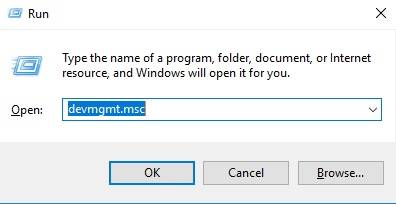
This opens Device Manager window.

Step 3. Click the arrow next to Display adapters to expand

Step 4. Right-click the graphics adapter, and select Properties
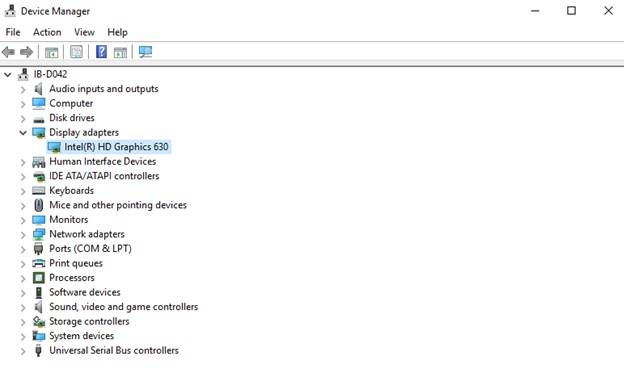
Step 5. Open the Driver tab, and click Update Driver on Properties window
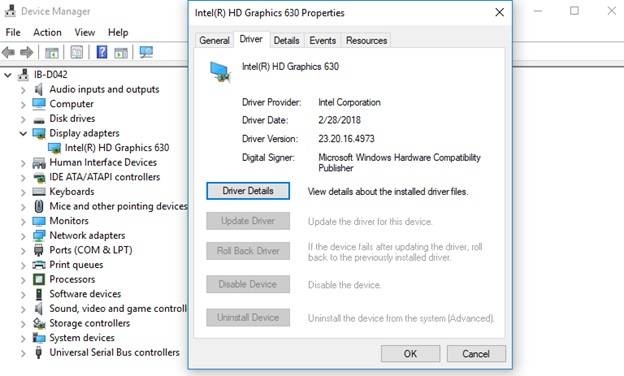
Step 6. Choose “Search automatically for updated driver software” on the screen that pops-up

Step 7. Restart the system and see if WMP is working

Method 3: Remove Conflicting Audio Drivers

If there are 3rd party audio drivers installed on your system, they may also create issues with Windows Media Player. To resolve the issue, uninstall them by using the steps given below:

Step 1. Launch Device Manager

Press the Windows + R keys >> Type devmgmt.msc >> Hit Enter

Step 2. Expand the Sound, video and game controllers

Step 3. Right-click the 3rd party audio driver, and select Uninstall

Step 4. Restart the computer, and see if WMP works fine

Method 4: Repair Windows Media Player

If Windows Media Player is not working, repairing it may fix the issue. To repair WMP, you’d need to disable it and then enable it back. Follow the given steps:

Step 1. Right-click the Start button at the bottom-left corner of your desktop

Step 2. Select Control Panel

Step 3. Click Uninstall a program under Programs

[NOTE]: If you’re unable to see Programs, click Category on the top-right corner, and select Small Icons

Step 4. At the left-hand pane, click Turn Windows features on or off

This opens Windows Features screen.

[NOTE]: You can also navigate to Windows Features screen directly:

Launch Run dialog box (Press Windows + R) >> Type optionalfeatures  >> Hit Enter

Step 5. Locate Media Features folder, and expand by clicking plus (+) sign

This will show Windows Media Player folder

Step 6. Uncheck the box next to Windows Media Player folder

Step 7. Click Yes when prompted

Step 8. Click OK on Windows Features screen

Step 9. Restart the system

This will disable Windows Media Player.

Now follow the given steps to enable the player:

Step 10. Repeat the steps as above till Step 5

Step 11. Check (put a tick) on the box next to Windows Media Player folder

Step 12. Continue following the steps from Step 7 till Step 9

See if this resolves the issue.  

Method 5: Install Pending Windows Updates

Keeping Windows up-to-date helps fix a lot of issues on your system. Let’s update the Windows and see if it resolves the WMP problem:

Step 1. Open Settings on your Windows system

Step 2. Click Update & Security

Step 3. Select Check for Updates

Step 4. Download the pending updates (if any)

Step 5. Restart the system

Now open WMP and see if it’s working properly.

Use Stellar’s Video Repair Tool

Sometimes, Windows Media Player creates problem or won’t play a video file if it is corrupt. An easy way to repair a corrupt file is by using a do-it-yourself video repair tool such as Stellar Repair for Video. The software can repair corrupt audio and video files of almost all popular file formats, without compromising the quality.

We hope that the simple and effective solutions given in this post help you to resolve the issues you’re facing with your Windows Media Player or while playing media files on it.

For any query and suggestion, feel free to comment in section below!


It’s often hard to find motivation when the world is going through tough times. The concerns of the majority usually find a way to impact the individual in any number of ways. That said, letting those concerns win is never the way to go. People spend a huge amount of their life building up a solid business. One should always be willing to work hard with and for it during both the best and most difficult times. Today, that means finding ways to attract attention while the world is focused on other things. And of course, that also means trying to find the motivation to keep going.

It’s true that circumstances can offer very odd changes to people’s lives. But one of the great things about the modern world is that expertise is out there. People are seldom walking a fully untread path. And by looking at expert advice one can often put together a solid business strategy. For example, people who depend on PPC might want to pay extra attention to Miami PPC services. In doing so one will be able to help leverage that experience into a solid plan to properly navigate a changing business landscape.

Of course one should consider a few things. And in particular what ideas to bring to the experts to talk about. One of the bigger options for Miami PPC services comes from expanding one’s infrastructure. For example, consider the case of someone who has relevant experience or backgrounds in whatever news is catching people’s attention. That’s something one can gain significant benefits from within the PPC market. And webinars, in particular, are a great way to do so.

It can take some work to put together. But that’s the other great thing about difficult times. It gives one a chance to really stretch his wings and try something new. People seldom jump into really different avenues until their circumstances change. And that means that someone interested in PPC has reason to do so. Likewise, the public as a whole will have increased interest as well because they’re a part of it all. And the experts are there to help.

One should also take advantage of the fact that schedules are going to be less cluttered. A less cluttered schedule can easily be leveraged into a less cluttered business strategy. One should use any extra time to clean things up in one’s business space. This applies to both physical and digital areas as well. One might use that time to clean up an office. And again, PPC experts can often offer up help in a variety of ways with the digital side of things. This can involve fine-tuning a website, going over analytics or finishing up nearly complete projects.

This is also a great opportunity to start working on more time-intensive projects. These the ideas which one might have been avoiding because of just how much of a time investment they might be. Of these, video is one of the most important. It can take a long time to start recording videos. One needs to put work into the filming location, personal appearance and general online persona. But doing so can increase one’s results in a number of ways.

One of the most important is that it can start to provide some presence on YouTube. This is a huge market that can be channeled in any number of directions. But it’s also important because it can help people feel a greater connection with one’s brand. People simply have more trust in a company they can attach a real face and voice to.

This is really only the tip of the iceberg. The most important thing to remember is that difficult times mean change. And change almost always means new opportunities. But that only happens when one is willing to push through the hard times to find the reward at the end.

The world of marketing changes quickly. What was effective last year is not going to be as effective this year. Therefore, particularly in the world of digital marketing, it is critical for companies to keep up with these big changes. There are a few major shifts that people are going to see in the world of online marketing in 2020 and beyond.

The Growth of Automated Chat Systems

Often called “chatbots,” these are personal assistants that are going to greet people on websites without having actual personnel behind them. 2020 is going to breathe more life into these automated chat systems than in the past.

Now, these bots are going to have more personality than they did before. This is going to make them more convincing, convincing people to actually use them.

The Growth of Social Shopping

For years, businesses have been looking for ways to get their social media followers to actually head to their online stores. Now, this dream has come to life. Social commerce is the term used to describe purchasing products directly through social media posts and ads.

Now, people do not have to leave the site to shop. Even though these posts aren’t brand new, they are going to be used in 2020 more than they ever have before.

Businesses need to take advantage of this and find ways to build social posts that can boost their revenue. This is going to be a gamechanger in 2020.

The Growth of Online Marketing

These are only two of the biggest ways online time clock and scheduling software marketing is going to change in 2020. Those who are looking to remain competitive this year and beyond need to make sure they stay on top of these changes. They are going to make a significant difference in the marketing world.

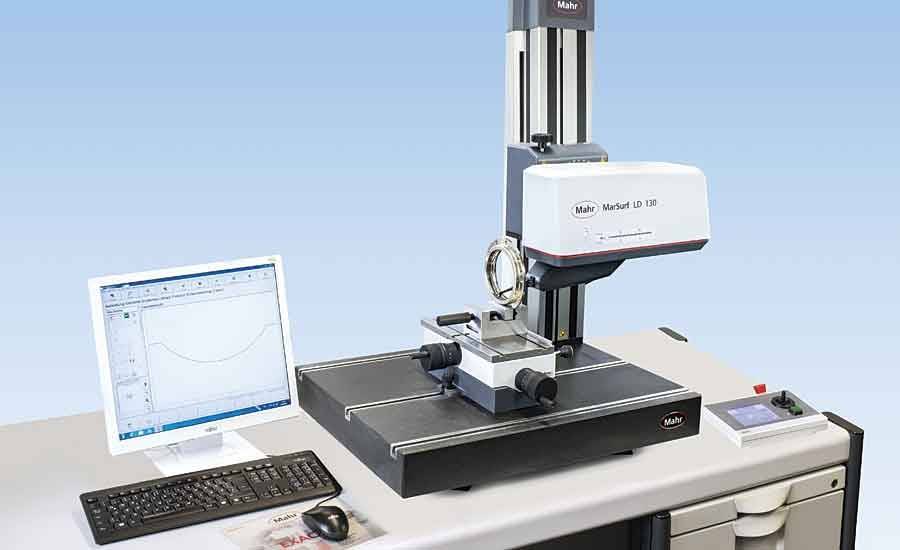
Surface measurement is a branch of metrology which generally refers to measuring the topography of precision surfaces, which also includes features (small scale) which are observed on top of surfaces. This simply includes the roughness of surfaces, fractality of surfaces and above all the primary form of surfaces.

It’s worth noting that the earliest pioneers understood the art of surface measurement but they may have lacked the knowledge to understand the roles microscopic structures and role measurement generally played in surface measurement. You can find out more about surface measurement equipment online. Keep reading to learn how the industry has changed.

Methods of comparing roughness

In the earlier generation surface measurement equipment was machined to ascertain the degree of roughness and were also used as reference surfaces. The pioneers at this period of time simply used their thumbnails to scratch the surfaces in question and used their sense of touch to compare them with their reference materials.

This method only worked for the experienced operators. But it proved to be hectic and mathematically unreasonable as there was no existence of data collection and means of quantifying their surfaces. That’s why this method proved to be very subjective to the earlier operators.

The change in preference from smooth to rough surfaces

After a long span of time in which the earliest machinists believed in the notion that smoother surfaces were better than rough surfaces, the view dramatically was changed following a sequence of events with the height of this events coming in the year 1930 when the Bentley Engines company which was at this time rated to be the best manufacturer in smooth cylindrical walls taking over in the management of the Le Mans 24-Hour race. This was followed by a series of events which were necessary for the betterment of surface texture, keeping in mind that at this period of time optical microscopes were used for magnification of surfaces (they were subjective).

Measure of texture and level

People started to use a trace stylus together with a mechanical amplifier which was linked in order to replicate the trace of grass on a glass smoked surface, this kind of method also proved to be subjective and non-workable at times.

Three years later E.J.Abbot invented an instrument that was referred to as the first analog surface instrument. It typically worked by using a stylus to contact the parts to be measured and for the first time this instrument provided an almost accurate quantity of texture.

He also later invented an Abbot-fire stone curve which typically worked by placing a simple curve on the surface to be measured and this curve only made contact on areas of question hence allowing the materials to calculate an air ratio as a function.

Analyzing data

The rising desire to trace a correct surface texture led to the realisation that the stylus tip and the devices that was used with it had a number of limitations. But if it could be merged with a large number of amalgams with different frequencies on the path being traced, it could be possible for the machines to analyze data which was raised from the oretical work.

This discovery led to the development of large numbers of commercial instruments which were popular for their basic rough parameters they included Rz, Ra and also above all the 2RC filters.

This kind of revolution enabled the earlier pioneers to create a number of instruments that could digitise the analog signal from the stylus hence generation of a typical surface profile trace.

With this kind of inventions, we could then apply mathematical tools to analyze and verify profile characteristics. It’s no wonder there are different kinds of materials with national and international quality standards which can be used to analyze different kinds of surface textures. They include the two-dimensional (2-D) profile which has lately been modified into a three dimensional.

Moreover, the modern digitalized instruments can gather a diverse spectrum of data from given kinds of traces and make analysis when possible as compared to the analog instrument which could only gather specific measurement data.

Importance of surface measurement

  1. It’s important in determining the stability of a particular object.
  2. it’s used to define surface roughness

iii. it’s used to measure surface roughness

  1. it’s essential in controlling the surface finish

What are Windows drivers? One can look at this question in a few different ways. The most concise answer would come from a practical standpoint. Windows drivers are small compiled libraries of computer code that tie into the underlying operating system. When Windows sees hardware it looks for instructions on how to use them.

To go with the library metaphor, one could think of the driver file as the volume on a shelf. The data within that volume would, in a library, be step by step instructions. But in Windows drivers it’s compiled functions written in computer code. This might code for what to do if a button has been pressed on a mouse. Or it could relate to something more complex.

All of that is also the beauty of a driver. Like a well-indexed library it takes very complicated things and simplifies how one relates to it all. However, that does leave a question hanging. Earlier on a question was raised about what a driver is. This is a technical explanation. But there’s a more important real-world description to be found.

A more real-world description of computer drivers is that it’s something that makes operating systems easy to use. Windows often automate the process. And one can divide drivers under windows into two categories. There are specialty drivers and common automatic windows drivers. Specialty drivers are associated with more exotic hardware. The best example of this type of driver can be found with video card manufacturers. Video cards are one of the single most competitive fields in computing. The only area that’s arguable as fast-paced is that of processor development. But processors work toward a standard with the very foundation of computers. This means that they don’t typically need any real driver support. They deal with the BIOS, which is a similar but still distinct topic.

Graphics drivers, on the other hand, do work through the standard driver methodology. What’s not so standard about them is how they’re managed. Graphics drivers usually rely on installers developed by the graphics card manufacturer. It’s one of those situations where it can look odd when examined directly. But it’s been the standard for so long that most people just consider it the everyday reality for how advanced graphics drivers are handled in Windows.

However, the real common everyday reality of Windows driver support is much closer to the ideal. Earlier on a reference was made to the fact that Windows can automatically update or install some drivers. What happens in these cases is that Windows notices new hardware and it searches the local installation base for compatible drivers. If it can’t find those drivers than it’ll make a note of that fact. For example, the hardware manager will have a question mark on that item. One can tell windows to go online to look for drivers. One goes to settings in the start menu. From there one chooses Updates and Security. From here one goes to Windows Update. Finally, one only has to push the Check for updates button. Windows will search a central database for any drivers and install those it finds.

The only problem there is that Microsoft is working on quite a few things at the same time. There’s a huge amount of hardware out there and Microsoft is only one company. They’re a huge company, but anyone who needs to serve as a jack of all trades will have difficulty perfecting all of them. This is why many people prefer to augment that automatic update system with third party automatic update services. This type of automated update service can even handle a lot of the more niche hardware situations.