

Author

Paul Watson

Browsing

Is your Windows Media Player not working? Are you having problem playing a video/audio file on Windows Media Player? Such problems may occur when there are issues with Windows Media Player or the audio/video file you want to play is corrupt.

In this post, we’ll discuss some methods to fix the issues with Windows Media Player and how to fix corruption in your video and audio files.

[NOTE]: Before trying the fixes, try to play the files by using another media player. Though Windows Media Player supports a wide range of file formats, it may still happen that the files you’re trying to play have a file format not supported by WMP.


Methods to Fix Windows Media Player Not Working

There may be various reasons due which Windows Media Player won’t work, such as missing Codecs, display driver issues, conflicting audio drivers, broken WMP installation, Windows updates issues. Let’s discuss some methods to fix these issues:

Method 1: Install Missing Codecs

Windows Media player has multiple Codecs that help in playing files. If a required Codec is missing, the player won’t be able to play the file.

Follow the steps given below to install the Codecs and fix problems:

Step 1. Go to Microsoft’s website and download Codecs (Check the version of your Windows Operating System before downloading the Codecs)

Step 2. Install the downloaded Codecs

Step 3. Restart the system

Step 4. Open the Windows Media Player and try to play the media file

Method 2: Update Display Driver

Sometimes, updating display drivers help resolve issues with the media player. Here are the steps to update display driver:

Step 1. Press Windows + R keys to launch Run dialog box

Step 2. Type devmgmt.msc, and hit Enter
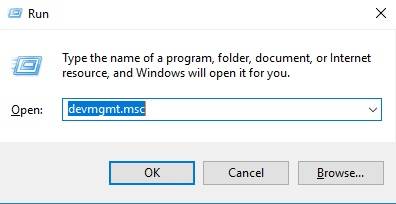
This opens Device Manager window.

Step 3. Click the arrow next to Display adapters to expand

Step 4. Right-click the graphics adapter, and select Properties
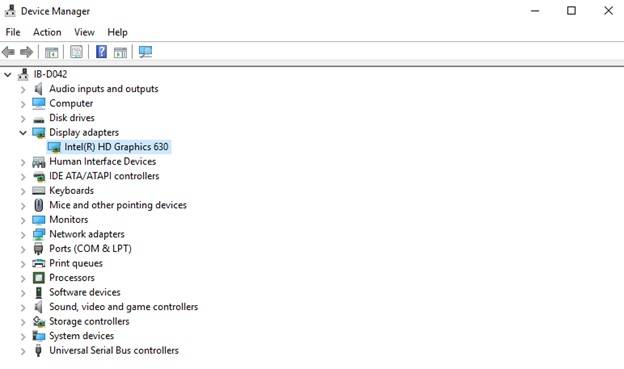
Step 5. Open the Driver tab, and click Update Driver on Properties window
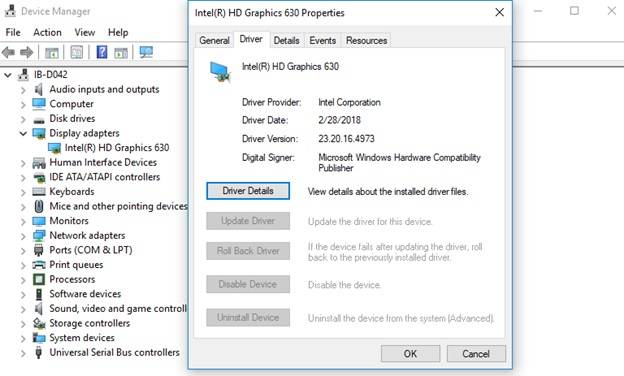
Step 6. Choose “Search automatically for updated driver software” on the screen that pops-up

Step 7. Restart the system and see if WMP is working

Method 3: Remove Conflicting Audio Drivers

If there are 3rd party audio drivers installed on your system, they may also create issues with Windows Media Player. To resolve the issue, uninstall them by using the steps given below:

Step 1. Launch Device Manager

Press the Windows + R keys >> Type devmgmt.msc >> Hit Enter

Step 2. Expand the Sound, video and game controllers

Step 3. Right-click the 3rd party audio driver, and select Uninstall

Step 4. Restart the computer, and see if WMP works fine

Method 4: Repair Windows Media Player

If Windows Media Player is not working, repairing it may fix the issue. To repair WMP, you’d need to disable it and then enable it back. Follow the given steps:

Step 1. Right-click the Start button at the bottom-left corner of your desktop

Step 2. Select Control Panel

Step 3. Click Uninstall a program under Programs

[NOTE]: If you’re unable to see Programs, click Category on the top-right corner, and select Small Icons

Step 4. At the left-hand pane, click Turn Windows features on or off

This opens Windows Features screen.

[NOTE]: You can also navigate to Windows Features screen directly:

Launch Run dialog box (Press Windows + R) >> Type optionalfeatures  >> Hit Enter

Step 5. Locate Media Features folder, and expand by clicking plus (+) sign

This will show Windows Media Player folder

Step 6. Uncheck the box next to Windows Media Player folder

Step 7. Click Yes when prompted

Step 8. Click OK on Windows Features screen

Step 9. Restart the system

This will disable Windows Media Player.

Now follow the given steps to enable the player:

Step 10. Repeat the steps as above till Step 5

Step 11. Check (put a tick) on the box next to Windows Media Player folder

Step 12. Continue following the steps from Step 7 till Step 9

See if this resolves the issue.  

Method 5: Install Pending Windows Updates

Keeping Windows up-to-date helps fix a lot of issues on your system. Let’s update the Windows and see if it resolves the WMP problem:

Step 1. Open Settings on your Windows system

Step 2. Click Update & Security

Step 3. Select Check for Updates

Step 4. Download the pending updates (if any)

Step 5. Restart the system

Now open WMP and see if it’s working properly.

Use Stellar’s Video Repair Tool

Sometimes, Windows Media Player creates problem or won’t play a video file if it is corrupt. An easy way to repair a corrupt file is by using a do-it-yourself video repair tool such as Stellar Repair for Video. The software can repair corrupt audio and video files of almost all popular file formats, without compromising the quality.

We hope that the simple and effective solutions given in this post help you to resolve the issues you’re facing with your Windows Media Player or while playing media files on it.

For any query and suggestion, feel free to comment in section below!


Were you injured from a work accident? Getting hurt at work is scary because a major injury could severely alter your life.

If you’re suffering from real accident-related discomfort and agony, working is likely impossible due to the extent of your injuries. Your best bet is to hire a work accident lawyer to help you receive compensation for your pain, suffering, and inability to earn a living.

To receive the best compensation, you’ll need to discover the top attorney to represent you. Consider these three things when hiring a lawyer to take your case.

1. Find an Attorney Focused on Work Accident Cases

Hiring an expert work accident lawyer will deliver the best results for your case. Some solo attorneys handle multiple practice areas, which lacks focus.

While there’s nothing fundamentally wrong with this approach, you’re still better off choosing an expert lawyer dedicated to helping victims who were hurt at work.

Before hiring a lawyer to represent you, spend time researching their practice first. If it’s a larger law firm, they may handle car accidents, personal injuries, maritime injuries, and work accidents.

On the surface, it may not seem like they’re focused on one area. But if they have dedicated lawyers within the firm focusing strictly on work accident cases, they fit the criteria of a focused law firm.

2. Choose a Work Accident Attorney Providing a Free Case Evaluation

Millions of lawyers need new clients to represent. Some charge fees to evaluate your case the minute you step foot in their office.

You might pay them a fee and discover your case isn’t a good fit for their practice. Are you willing to spend money on a lawyer that might not take your case?

You’re better off choosing an attorney that provides free case evaluations. This lawyer or firm shows that they seriously want to represent you.

They’re willing to sit down and talk about your case for free. They prove they’re willing to help by discussing your situation before compensation ever enters the picture.

3. Discover a Work Accident Attorney with a Phenomenal Track Record of Success

Your ultimate goal is to succeed with your lawsuit. You were hurt at work and deserve ample compensation for medical bills, lost wages, and other expenses.

We believe you’ll achieve better results by putting the odds in your favor. Find a work accident attorney who receives top offers for their clients, large court awards, and has decades of experience.

Bottom Line

Getting injured from a work accident is difficult to overcome. You’re experiencing major pain and suffering. You can’t work because your injuries are severe enough to keep you sidelined for the time being. And you need money to pay your bills.

Use this information to know what to look for when hiring a work accident attorney. It will help you discover the perfect lawyer or law firm to handle your case.

Laser Hair Removal Treatment is very important that permanently discharge all the unwanted hairs and ensure that the patient gets a clear and glowing skin. This treatment begins with the wavelengths that is emitted by lasers and it further dart over the hair follicle. During this process, it absorbs the dispersed light and efface out all the unwanted follicles ensuring protection to the skin of patient. This is a repetitive treatment and once it gets over, the chance hair growth reduces extensively. Therefore look for laser hair removal in melbourne. It will resolve your problem of unwanted growth without damaging any of the skin layer. Here we have discussed about some of the essential points that needs to be considered before going for laser hair removal treatment at the helm.

Avoiding waxing and any other measures of hair removal

Laser hair removal treatment works perfect onto a skin that has not done threading, waxing or plucking. It targets deeply onto the hair root and inspect the growth of hair inside it. Experts believe that if an individual restrict himself for plucking and waxing, he would surely get reliable and noteworthy result out of it. Thus, it is recommended to take care of such miscellaneous elements before going for laser treatment. Search online or interact with neighbours or colleagues to determine and evaluate the success ratio for such treatment. It would add gainful knowledge and better insight about the same.

Avoid getting direct interaction with the heat of sun

It is essential to note that whenever you are prepping for laser treatment, you need to avoid direct interaction with sun. It can be harmful for the skin and hair as well. Moreover, if you get exposed to scorching rays of sun then you will experience pain at the time of surgery. Therefore keep a note of this and get a safe and secure treatment to the fullest. You can check out the views of past patients and determine about the results of laser treatment. You can prepare a list of all those things that needs to be considered at the time of laser hair removal treatment. This would surely help you.

Stop using bleach products

It is crucial to note that one should not apply cosmetics and also prohibit yourself from hair colouring or other saloon related activities. This attempt will contribute significantly in destroying and effacing out all the permanent hair under continuous inspection by professionals and experts. As discussed that laser treatment target the follicles and if you do bleaching and colouring, it weakens the target and the possibility of re-growth might take place.  Along with that, one must pay attention over the medication prescribed in order to make this treatment a greater success. Look over the sensitivity of skin and disclose all the past medical history to our respected doctors for a better ad effective approach.

Therefore, contact Skinn and Laser clinic now and get best treatment of laser hair removal.

All home appliances slowly wear out over years of use and need to be replaced or repaired, but when your water heater breaks down the problem can be much bigger than being surprised by a cold shower. If you don’t invest in regular water heater repair or replace your water heater before it quits working completely, you could have a major leak on your hands and expensive water damage in your home.

Fortunately, you don’t have to wait for disaster to strike. Here are 4 ways you can know that it’s time to repair or replace your water heater before the damage is done:

Rattling and Rumbling

When a water heater ages, sediment builds up at the bottom of the tank. This sediment hardens into a solid mass as it’s heated and reheated, making the water heater less efficient.

If it sounds like a herd of elephants or a drum line is coming through your home every time you turn on the hot water, it’s time to replace your unit. It won’t be long before the hardened sediment begins to create tiny holes and cracks in the tank, leading to leaks and water damage.

Rust, Corrosion, and Water Discoloration

Take a look at your water heater and note any areas of visible rust or corrosion. Specifically, look around the inlet and outlet connections and the temperature and pressure relief valves, as these are places that will show corrosion first.

Similarly, if you notice rusty water coming from your heater, the most likely cause is rust inside the tank. To be sure that the rust is coming from your water heater and not your pipes, empty the water into a gallon bucket. If the water isn’t running clear after two or three buckets, your tank is rusting and needs to be replaced.

Pools of Water Around the Heater

As the metal heats, it expands, which will force water out of any small cracks or fissures in the tank. When the tank cools, the leaking stops, resulting in small pools of water around the water heater but not a full-fledged leak.

To make sure that the water is coming from the heater, check the temperature overflow pipe and all connections and fittings. If these are dry, then the water is coming from the tank and the heater needs to be replaced.

Lukewarm Showers and Dirty Dishes

Maybe you hopped into the shower and couldn’t get the water to your preferred temperature, even after cranking the hot faucet all the way up. Or, maybe you opened your dishwasher to discover the dishes didn’t get the heated rinse they need to get sparkling clean. If your water isn’t getting heated, it’s usually a sign that your heater is beyond repair and needs to be replaced.

In addition to these four signs, keep tabs on the age of your water heater. Depending on use, most units last around 10 years. If your unit is over 10 years old and located where a leak could cause significant water damage to your home, it’s best to get it replaced rather than risk further use.

To keep your water heater in proper working order and extend its life, consider regular maintenance checks and scheduled water heater repair. Contact us for more information or to schedule a maintenance check. It could save you thousands!


About

Vanilla Prepaid card is a simple, secure, and convenient way to manage your money. as this card is not a credit card, it is not necessary to go through credit checks, to disclose personal datas and to fill any paper forms. Users can own and use this card without bank accounts. As this card does not require any credit checks, user with poor credit status can also avail of this card. This is a powerful money management tool and the user can connect with their account easily with this tool. The card will be issued on the basis of virtual bank accounts created with The Bancorp Bank. Since the finance available in the card is prepaid and prefixed, the money spending is limited to the available balance and the user can check the balance available in the card periodically. Vanilla mastercard can be used wherever Visa Debit cards and debit Master cards are accepted.Users can use this card for payments at gas stations, restaurants, paying bills and all other shopping. My vanilla card can be availed as a Master card or Visa card, depending on the user’s choice.

Adding funds

Finance can be added to this card easily with Direct Deposit and Vanilla Direct Load.

Direct deposit is the simplest and fastest way of adding money to the card. Funds can be transferred securely from one MyVanilla card account to others. For loading cash in the card, the user has to complete ID verification on the official website of the bank.

To Withdraw Money

This card can be used for ATM withdrawal and another form of finance access. Money can be withdrawn from this card by using Money pass surcharge-free ATMs. For the withdrawal of money from ATM the user will be charged with some service charge. The user will be charged $1.95 per Domestic ATM Cash Withdrawal or $4.95 per International ATM Cash Withdrawal.

The necessity for checking the balance

Some merchants will charge some incidental charges for Preauthorization along with the purchase value. This amount will be refunded after the completion of the transaction. So it is mandatory to check the finance available and to ensure that your card has sufficient funds for the transaction.

Checking the balance

Users can check my vanilla card balance available in the card by logging on to the official website. The userhas to provide the security number present in the card, expiry date and CVV number to log in and check balance online.

The balance available in the card can also be tracked by setting text and email alerts. Standard text and data charges may be applicable to the service providers.

The finance available in the card can also be tracked and managed by downloading My Vanilla mobile application that is available in Google Play or App Store.